
Lives in the menu bar
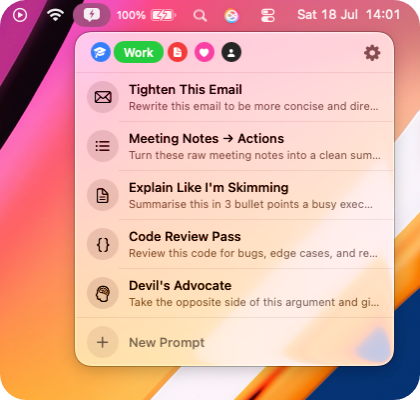
PromptBar stays available without taking over the Dock or your desktop.
A Pixelmere app for Mac

Keep your best prompts one click away. Organise, edit and copy the words you use every day, straight from the menu bar.
Coming to the Mac App Store in September 2026
Built for recall
PromptBar keeps useful language close without becoming another place to work. Open it, copy what you need and carry on.
PromptBar stays available without taking over the Dock or your desktop.
Copy a complete prompt to the clipboard in one action, ready to paste wherever you work.
Separate writing, research, coding or everyday prompts into clear, customisable groups.
Edit titles and prompt text, choose distinctive symbols and put frequently used prompts first.
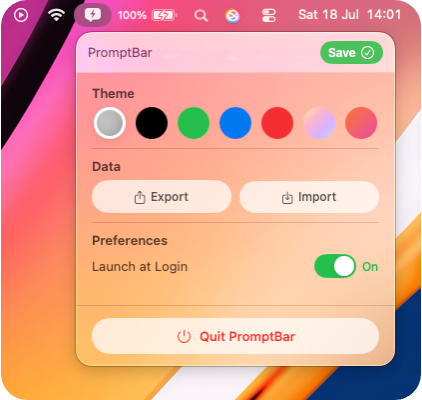
Pick a quiet neutral appearance or add colour while retaining a compact, native Mac feel.
Export your organised prompt library as JSON and import it again when you need to restore or move it.
Made to fit your Mac
Set a theme, launch PromptBar when you sign in and move your library with simple import and export controls. The useful settings are close; everything else stays out of the way.
A lighter workflow
No account, browser tab or AI connection is involved. PromptBar is a focused utility for the prompts you have already decided are worth keeping.
Select PromptBar from the Mac menu bar.
Move between your tabs and find the prompt by title or preview.
Click once to place the complete text on your clipboard.
Use it in the writing or AI tool of your choice.
Private by design
PromptBar has no accounts, analytics, advertising or online service. It does not send your prompts to an AI model or anywhere else. Your content is stored locally unless you choose to export a backup file.
PromptBar support
Read the support guide or email us. We aim to reply within two working days.